跳转至

Recent Blog

python decoder 介绍

python decoder(装饰器)是python的高级用法,用来拓展函数或类的功能。不过也增加初学者 阅读代码的难度

例如flask可以在需要验证用户登录的请求函数上添加装饰器,只有当用户登录了才可以调用该>页面,非常方便

原理

decoder 其实也是一个函数,装饰器函数会返回真实函数,并会增加额外的代码,如

# 定义wraper
def log(func):
    def wrapper(*arg):
        print('func called')
        return func(*arg)

    return wrapper

# 使用
def hello(Name=None):
    print('Hello %s'%Name)

new_hello = log(hello)

new_hello('bob')
输出 func called Hello bob

使用wraper 的原因

提供额外的功能,例如计时,日志等。 另外wraper还有更多强大的功能

def fib(n):
    if n <= 1: return 1
    return fib(n-1) + fib(n-2)

这种递归调用非常费时,而使用wraper 可以提供一个缓存器

def memory(func):
    cache = {}
    def wrapper(*args):
        if args not in cache:
            cache[args] = func(*args)
        return cache[args]
    return wrapper

@memory
def fib(n):
    if n <= 1: return 1
    return fib(n-1) + fib(n-2)


## 给类wraper

上面是函数wraper 类也可以作为wraper 但需要类支持()调用类似c++的类函数
在python里需要实现 `__call__` 方法

```python
import functools

class MemoryClass():
    def __init__(self, is_logging, func):
        self.is_logging = is_logging
        self.func = func
        if self.is_logging:
            print('logging')
        self.cache = {}

    def __call__(self, *args):
        if args not in self.cache:
            self.cache[args] = self.func(*args)

        return self.cache[args]

def memory(is_logging):
    return functools.partitial(MemoryClass, is_logging)


@memory(is_loging=True)
def fib(n):
    if n <= 1: return 1
    return fib(n-1) + fib(n-2)


print(fib(5))
类wrapr 可以增加参数,相比函数装饰器,类装饰器具有更加灵活,封装性更好等优点~

wraper 带来的问题

  1. 改变原来的函数属性,例如函数名, 因为装饰器用新函数替换了原来的旧函数。 所以新函>数少了旧函数的属性 解决办法
import functools

def advertising(func):
    @functools.wraps(func)
    def wrapper(*args):
        print('欢迎关注微信公众号: Charles的皮卡丘')
        return func(*args)
    return wrapper

@advertising
def add_1(a, b):
    '''加法运算'''
    return a + b
  1. 获取参数
import inspect
import functools

def check(func):
    a = 0
    @functools.wraps(func)
    def wraper(*args, **kwargs):
        a += 1
        print(a)
        # 在wraper里检查参数
        getcallargs = inspect.getcallargs(func, *args, **kwargs)
        if getcallargs.get('divisor') <= 1e-6 and getcallargs.get('divisor') >= -1e-6:
            return False
        return func(*args, **kwargs)

    return wraper


@check
def dowork(arg1, arg2):
    return arg1 + arg2

dowork(1,2)

此时会报错,a在赋值之前引用了。 需要将a声明为 nonlocal
乐观锁悲观锁

先说这两种锁都不是编程里面用到的锁, 而是一种策略。 在数据库中用的多。
而且在java里面有个原子bool AtomicBoolean 的实现也用到乐观锁的策略, AtomicBoolean::compareandswap

这里以数据库管理服务(DBMS)来说明这两种锁的区别,在并发的情况下

悲观锁

悲观锁策略预期是多个请求会操作同一个数据,导致数据不可靠。 悲观锁的策略就是上锁,不让其它请求修改, 即排他锁。

这种排他锁与我们平常编程用的互斥锁道理相同, 是性能比较低的一种锁,但能保证数据准确。

乐观锁

乐观锁实际是不上锁, 预期多个请求不会修改同一分数据。而是在最后提交的时候再去确认数据是否一致,如果一致则提交,如果不一致则报错,需要认为干涉

所以乐观锁的数据也是可靠的, 且性能较好。 这里关键是如何确认数据一致

乐观锁的确认并提交

这里举例sql的来说明

select quanity from items where id =1;

//得到quanity=3,然后更新

update items set quantity=2 where id=2 and quantity=3
更新时,会确认quantity为预期的3,否则不执行或者报错。

这样有个问题, 虽然单条语句是原子的,但是两条语句不是, 会出现ABA的情况

例如当一个请求1执行到select后,得知quantity=3, 然后请求2先更新quantity=2,然后又更新为quantity=3 然后请求1继续执行update,这会成功,虽然quantity=3是一致的,但是不能保证其它数据是一致的或者完全没有引起安全问题

因此另一种办法是判断只增version或者timestamp,每次请求时去更新。这两种办法都能确保数据一致。 但是因为数据库同时只允许一个请求修改version,那么就出现了竞争情况,会导致其它请求失败

例如多个请求同时记录了version=1, 则当一个请求完成的时候,version=2, 那么其它请求提交时发现verison变了,只能报告失败 虽然这样能保证数据正确,但是会导致其它请求失败

而电商平台中, 则采用另一种方式确认

select quanity from items where id =1;

//得到quanity=3,然后更新

update items set quantity=2 where id=2 and quantity > 0

这样就规避了上面两个方法的缺点

compareandswap

compareAndSet(expect_val, new_val)

上面的乐观锁就是compareandswap的解释:

先对比,如果一致则更新

再说一下java的实现,

    UNSAFE_ENTRY(jboolean, Unsafe_CompareAndSwapInt(JNIEnv *env, jobject unsafe, jobject obj, jlong offset, jint e, jint x))  
      UnsafeWrapper("Unsafe_CompareAndSwapInt");  
      oop p = JNIHandles::resolve(obj);  
      jint* addr = (jint *) index_oop_from_field_offset_long(p, offset);  
      return (jint)(Atomic::cmpxchg(x, addr, e)) == e;  
    UNSAFE_END  

在unsafe.cpp 找到实现如下

#define LOCK_IF_MP(mp) __asm cmp mp, 0 \
__asm je L0 \
__asm _emit 0xF0 \
__asm L0:

int mp = os::is_MP();
__asm {
mov edx, dest
mov ecx, exchange_value
mov eax, compare_value
LOCK_IF_MP(mp)
cmpxchg dword ptr [edx], ecx
}
_emit 是用于生成指令的, 生成锁的指令,有cpu提供锁机制 从上下文看, 这个指令应该是上锁, 如果mp != 0 则上锁。

记录在部署一个nginx fastcgi 项目时失败, fastcgi 通过unix socket 通讯

这是一个flask 项目, 使用flup创建的fastcgi

#!/usr/bin/env python
from flup.server.fcgi import WSGIServer
from main import app

if __name__ == '__main__':
    # for apache
    # WSGIServer(app).run()
    # for nginx, need to set conmunication sock between nginx and the cgiserver
    WSGIServer(app, bindAddress='/tmp/myflask-fcgi.sock').run()

这里直接说明结果, socket 文件不能创建在/tmp/ 或者 /vat/tmp 目录。

nginx 错误配置

    location / { try_files $uri @myflask; }
    location @myflask {
        include fastcgi_params;
        fastcgi_param PATH_INFO $fastcgi_script_name;
        fastcgi_param SCRIPT_NAME "";
        fastcgi_pass unix:/tmp/fcgi.sock;
    }

nginx 错误提示

 connect() to unix:/tmp/fcgi.sock failed (2: No such file or directory) while connecting to upstream

原因

如果socket创建在/tmp 或者 /var/tmp 目录, 只能被socket的进程发现。 意思是只有cgi程序能发现,所以nginx 无法连接了

正确配置是创建到/var/sockets 目录,并注意权限问题

    location / { try_files $uri @myflask; }
    location @myflask {
        include fastcgi_params;
        fastcgi_param PATH_INFO $fastcgi_script_name;
        fastcgi_param SCRIPT_NAME "";
        fastcgi_pass unix:/var/sockets/myflask-fcgi.sock;
    }

关于unix socket

以上是一种解决办法,当然使用ip来连接nginx和cgi也是可以的,但是unix socket 有不少好处。

关于cgi

上面无论使用unix socket 还是 ip 来访问cgi, 这两种方式都是通过cgi来提供web服务。
而nginx 不支持cgi, 所以需要自己来通过python的 flup 来实现fastcgi。 nginx 只不过是一个代理的作用。而apache和tomcat 都能支持cgi

cgi 的定义是 common gateway interface, 是一个协议。 fastcgi,uwcgi都是升级版或者变种。  
flup实现了cgi的服务程序,也就是可以用来解析脚本(python php 等等),提供web服务。

另外除了以上方式, nginx也可以使用pypass proxy 来转发请求,由应用自己来实现网络处理。

location / {
        proxy_pass https://localhost:8080
        proxy_set_header Host            $host;
        proxy_set_header X-Forwarded-For $proxy_add_x_forwarded_for;
        proxy_set_header X-Real-IP       $remote_addr;
        proxy_set_header X-Scheme        $scheme;
        access_log /var/log/nginx/access.log my_tracking;
    }

如过是python 就需要监听某个端口,这种是不稳定的。 不适合生产模式下使用。

linux 添加打印机

记一次arch 上添加打印机的过程, 公司有一个Ricoh c5503 的打印机,ip 192.168.4.99 通过nmap这个地址可以发现开了不少端口

PORT     STATE SERVICE
21/tcp   open  ftp
23/tcp   open  telnet
80/tcp   open  http
139/tcp  open  netbios-ssn
514/tcp  open  shell
515/tcp  open  printer
631/tcp  open  ipp
7443/tcp open  oracleas-https
8080/tcp open  http-proxy
9100/tcp open  jetdirect

启动avahi-daemon 服务

这个服务提供mDNS功能, 可以发现局域网内的主机提供的服务,例如打印服务,ssh。 各个主机通过224.0.0.251 地址多播自己提供的服务
主机也可以配置自己想广告的服务,这是用户可选的。 具体看wiki

通过执行一下命令可以看到打印服务

 avahi-browse --all --ignore-local --resolve --terminate 

找到有用的信息如下:

+    br0 IPv4 RICOH MP C4503 [002673734B1D]                 Web Site             local
=    br0 IPv4 RICOH MP C4503 [002673734B1D]                 Web Site             local
   hostname = [RNP002673734B1D.local]
   address = [192.168.4.99]
   port = [80]
   txt = ["path=/"]

安装cupsd

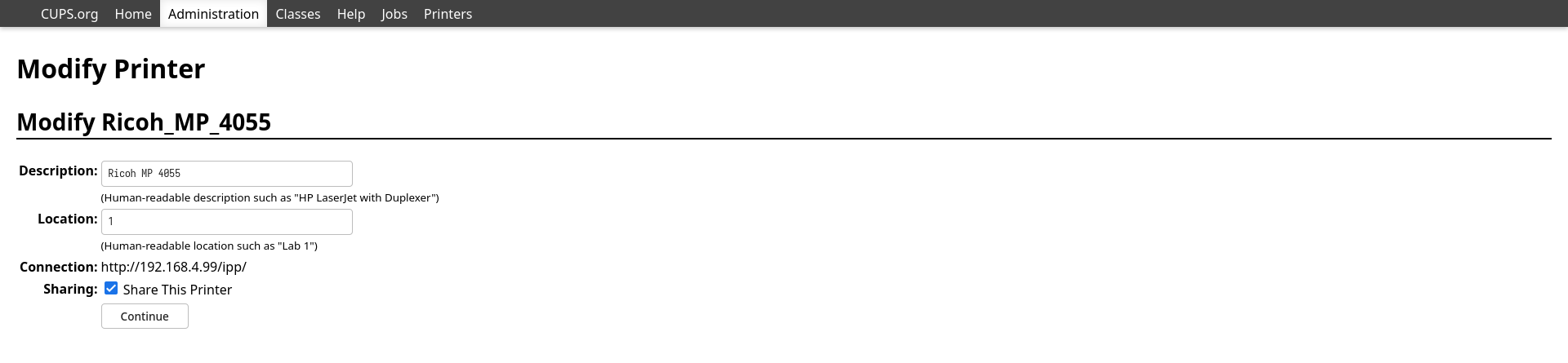
启动cups-browsed.service服务后, 可以通过网页也配置打印机, 包括分享自己的打印机和添加别人的打印机。 我这里需要添加打印机服务

  1. 浏览器输入http://localhost:631/ 可以打开网页
  2. administrator -> add printer 输入root和密码
  3. 有以下选项
    Backend Error Handler
    Internet Printing Protocol (ipp)
    LPD/LPR Host or Printer
    Internet Printing Protocol (ipps)
    AppSocket/HP JetDirect
    Internet Printing Protocol (http)
    Internet Printing Protocol (https)
    Windows Printer via SAMBA 
    
  4. 我这里选择的AppSocket/HP JetDirect, 因为nmap显示是支持jetdirect的。
  5. 输入地址socket://192.168.4.99:9100
  6. 输入自定义的打印机名称和路径/

至此,浏览器打印页面就可以看到添加的打印机了

分享打印机

没有分享的时候,只有本机可以使用,当想要给手机使用时,可以勾选分享。此时CUPS会使用mdns广播打印机服务到主机所处的网段,所以手机也必须在这个网段里。 cups_share.png

更新

开始时我走的ipp协议,打印机地址为'ipp://192.168.4.99:631/ipp', 后来连不上打印机

通过查端口发现有维护人员修改了打印机端口信息, 631和80端口都被封了,可能是出于安全考虑

PORT      STATE    SERVICE
21/tcp    open     ftp
23/tcp    open     telnet
80/tcp    filtered http
139/tcp   open     netbios-ssn
514/tcp   open     shell
515/tcp   open     printer
631/tcp   filtered ipp
7443/tcp  open     oracleas-https
8080/tcp  open     http-proxy
9100/tcp  open     jetdirect
65000/tcp open     unknown
631没有开放,参考windows的同事配置,发现他们用的9100端口(9100是走socket协议),所以需要重新添加打印机
新的网络地址即为'socket://127.0.0.1:9100'

更新2

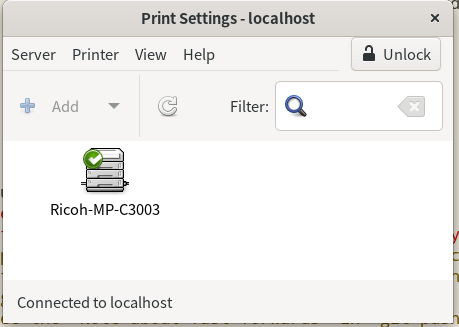
之前是自己搓的桌面环境,需要手动在CUPS的web界面添加打印机。而自从使用了完整桌面GNOME发现非常简单。GNOME自带有打印机配置工具,只需要填入打印机的IP(也许由于不在一个网段),就会自动检测支持的协议并配置好。

Pasted image 20240410175417.png

oauth2 认证说明

oauth2 是依赖第三方的认证方式, 例如玩游戏的时候弹出QQ登录,微信登录。 这种游戏运营商并不需要用户注册,而是直接从QQ或者微信那里获取用户的OPENID, 然后游戏游戏运营商存储并通过OPENID来识别用户

而且, 有资质的游戏运营商还可以通过玩家的openid来获取用户的信息, 例如用户的手机号,网名,年龄等信息。 但有资质这个是有QQ和微信来决定的,游戏运营商需要先去腾讯那里注册认证。腾讯愿意给游戏运营商分享多少信息是腾讯说了算。 所以有用户的数据在手, 腾讯稳稳当国内老大

以QQ登录为例,当玩家登录游戏时,游戏运营商先让用户访问QQ的auth2服务器,并带上游戏运营商的id。待QQ认证后会回调运营商注册的回调接口 一般为oauth/callback,并且带上用户的openid。 这样游戏运营商就知道是谁登录了。

如果游戏运营商需要更多用户资料时,例如注册, 运营商可以通过QQ的查询接口,密钥以及用户的openid 去查询。 这样就拉取到了用户的信息。 然后如果资料不全, 再让玩家补充,例如输入身份证号。这应该国家不准腾讯向别人分享的,必须要用户自己输入。。

使用github的oauth认证

  1. 先去github -> developer 创建oauth应用, 输入自己的回调地址。 当用户被github认证后,会调用这个地址

  2. 在服务端配置,利用一个开源 oauth2_proxy工具, 项目地址:

https://github.com/oauth2-proxy/oauth2-proxy
  1. 配置nginx

配置`oauth2_proxy

之前遇到问题,一直授权不成功, 原因是cookie_secure 配成了true, 即使是https下。原因未知

auth_logging = true
auth_logging_format = "{{.Client}} - {{.Username}} [{{.Timestamp}}] [{{.Status}}] {{.Message}}"
## pass HTTP Basic Auth, X-Forwarded-User and X-Forwarded-Email information to upstream
pass_basic_auth = true
# pass_user_headers = true
## pass the request Host Header to upstream
## when disabled the upstream Host is used as the Host Header
pass_host_header = true
## Email Domains to allow authentication for (this authorizes any email on this domain)
## for more granular authorization use `authenticated_emails_file`
## To authorize any email addresses use "*"
# email_domains = [
#     "yourcompany.com"
# ]
email_domains="*"
## The OAuth Client ID, Secret
provider="github"
client_id = "cef54714c84e3b0c2248"
client_secret = "a96d3d94771273b5295202d03c0c2d3ca7f625dc"
## Pass OAuth Access token to upstream via "X-Forwarded-Access-Token"
pass_access_token = false
## Authenticated Email Addresses File (one email per line)
# authenticated_emails_file = ""
## Htpasswd File (optional)
## Additionally authenticate against a htpasswd file. Entries must be created with "htpasswd -s" for SHA encryption
## enabling exposes a username/login signin form
# htpasswd_file = ""
## Templates
## optional directory with custom sign_in.html and error.html
# custom_templates_dir = ""
## skip SSL checking for HTTPS requests
# ssl_insecure_skip_verify = false
## Cookie Settings
## Name     - the cookie name
## Secret   - the seed string for secure cookies; should be 16, 24, or 32 bytes
##            for use with an AES cipher when cookie_refresh or pass_access_token
##            is set
## Domain   - (optional) cookie domain to force cookies to (ie: .yourcompany.com)
## Expire   - (duration) expire timeframe for cookie
## Refresh  - (duration) refresh the cookie when duration has elapsed after cookie was initially set.
##            Should be less than cookie_expire; set to 0 to disable.
##            On refresh, OAuth token is re-validated.
##            (ie: 1h means tokens are refreshed on request 1hr+ after it was set)
## Secure   - secure cookies are only sent by the browser of a HTTPS connection (recommended)
## HttpOnly - httponly cookies are not readable by javascript (recommended)
# cookie_name = "_oauth2_proxy"
cookie_secret = "beautyfly"
cookie_domains = "beautyflying.cn"
cookie_expire = "168h"
# cookie_refresh = ""
cookie_secure = false
# cookie_httponly = true

可以将oauth2 配置成服务

[Unit]
Description = OAuth2 proxy for www blog

[Service]
Type=simple
ExecStart=/usr/bin/oauth2_proxy -config /etc/oauth2-proxy.cfg
[Install]
WantedBy=multi-user.target

nginx 配置

    location /oauth2/ {
            proxy_pass       http://127.0.0.1:4180;
            proxy_set_header Host                    $host;
            proxy_set_header X-Real-IP               $remote_addr;
            proxy_set_header X-Scheme                $scheme;
            proxy_set_header X-Auth-Request-Redirect $request_uri;
        # or, if you are handling multiple domains:
        # proxy_set_header X-Auth-Request-Redirect $scheme://$host$request_uri;
    }

    location = /oauth2/auth {
    proxy_pass       http://127.0.0.1:4180;
    proxy_set_header Host             $host;
    proxy_set_header X-Real-IP        $remote_addr;
    proxy_set_header X-Scheme         $scheme;
    # nginx auth_request includes headers but not body
    proxy_set_header Content-Length   "";
    proxy_pass_request_body           off;
    }

    location / {

    auth_request /oauth2/auth;
    error_page 401 = /oauth2/sign_in;

    # pass information via X-User and X-Email headers to backend,
    # requires running with --set-xauthrequest flag
    auth_request_set $user   $upstream_http_x_auth_request_user;
    auth_request_set $email  $upstream_http_x_auth_request_email;
    proxy_set_header X-User  $user;
    proxy_set_header X-Email $email;

    # if you enabled --pass-access-token, this will pass the token to the backend
    auth_request_set $token  $upstream_http_x_auth_request_access_token;
    proxy_set_header X-Access-Token $token;

    # if you enabled --cookie-refresh, this is needed for it to work with auth_request
    auth_request_set $auth_cookie $upstream_http_set_cookie;
    add_header Set-Cookie $auth_cookie;

    # When using the --set-authorization-header flag, some provider's cookies can exceed the 4kb
    # limit and so the OAuth2 Proxy splits these into multiple parts.
    # Nginx normally only copies the first `Set-Cookie` header from the auth_request to the response,
    # so if your cookies are larger than 4kb, you will need to extract additional cookies manually.
    auth_request_set $auth_cookie_name_upstream_1 $upstream_cookie_auth_cookie_name_1;

    # Extract the Cookie attributes from the first Set-Cookie header and append them
    # to the second part ($upstream_cookie_* variables only contain the raw cookie content)
    if ($auth_cookie ~* "(; .*)") {
        set $auth_cookie_name_0 $auth_cookie;
        set $auth_cookie_name_1 "auth_cookie_name_1=$auth_cookie_name_upstream_1$1";
    }

    # Send both Set-Cookie headers now if there was a second part
    if ($auth_cookie_name_upstream_1) {
        add_header Set-Cookie $auth_cookie_name_0;
        add_header Set-Cookie $auth_cookie_name_1;
    }

        root   /usr/share/nginx/html/blog;
        index  index.html index.htm;
    }

    #error_page  404              /404.html;

    # redirect server error pages to the static page /50x.html
    #
    error_page   500 502 503 504  /50x.html;
    location = /50x.html {
        root   /usr/share/nginx/html;
    }

使用baidu 的oauth 认证

使用正则来校验输入合法性

软件加固里面经常使用的办法就是校验用户输入,例如要求名词需要是大小写或_开头, 支持包含大小写 ,中划线 -,下划线_以及点.

那么相应的正则表到式为^[a-zA-Z_][-a-zA-Z1-9_.]*$,校验方法为

echo $1 | grep -q '^[a-zA-Z_][-a-zA-Z1-9_.]*$'
test $? -eq 0 && echo "yes" || echo "no"

用python实现

Type "help", "copyright", "credits" or "license" for more information.
>>> import re
>>> print(re.match('^[a-zA-Z_][a-zA-Z0-9\-_.]*$', '_abcdedf.', flags=0))
<re.Match object; span=(0, 9), match='_abcdedf.'>
>>> print(re.match('^[a-zA-Z_][a-zA-Z0-9\-_.]*$', '._abcdedf.', flags=0))
None

C++ 小技巧

使用lambda 定义一个可变的const

因为const 不能改变的,只有在程序运行的时候初始化。 而通过lamda,可以通过获取命令行输入来改变值

const int x = []() -> int {
        int t;
        std::cin >> t;
        return t;
}();

gdb调试容器内的进程

先来个gdb手册链接
这里记录一下自己常用的技巧

恢复debug符号

通常上线的程序要strip符号表来减少内存占用和硬盘占用,会执行以下命令

## 1. 只保留debug表的内容(可选),为以后调试用,生产时不用
objcopy --only-keep-debug foo foo.dbg

## 2. 将foo的debug表删除,不要任何调试信息,用于生产使用
objcopy --strip-debug  foo 

如果生产出问题了,就需要恢复debug信息,add-gnu-debuglink参数可以是foo.dbg, 也可以就是strip之前的foo文件
所以第一步是可选的

## 3. 恢复debug信息
objcopy --add-gnu-debuglink=foo.dbg foo

但其实第三步也是可选的,只要把foo.dbg放到foo相同位置时,gdb就可以读取到debug信息

使用.gdbinit

.gdbinit 文件是类似.bash_profile的文件,一般在home目录或者项目根目录, gdb 自动读取
也可以手动读取其他位置的, 在gdb执行source /somedir/.gdbinit

通常可以在这个文件里定义一些设置例如set pagination off 关闭输出分页, 就不用每次交互确定
还可以定义命令 如pvector可以打印vector内的所有成员, 非常比较方便

gdb 调试容器内的进程

因为容器内运行的程序都是strip了debug符号的,所以之前调试都是先将debug文件复制到容器对应位置,然后将源码也映射到容器内,而且还要安装gdb和重新开启priveledge模式, 非常繁琐。
所以尝试如下操作:
1. 能不能单独一个容器安装gdb和符号和代码文件, 跨容器去调试另一个容器的进程呢? 2. 能不能在宿主机上直接调试容器进程呢?

经过一番搜索,没有第一种方案的实践办法,但第二种方案亲测可行!

步骤

  1. 先启动容器,一般业务主进程的pid为1
  2. 在容器外面执行ps aux | grep xxx,因为在很多情况是多个容器跑同一个程序,所以ps aux 通过参数名来确定进程的pid, 当然最好的方式是通过进程namespace了
  3. 使用sudo gdb -p pid, 提示缺少Missing separate debuginfo for target
  4. 将debug符号文件复制到容器对应容器的目录
  5. 再次attach,提示缺少源文件/builds/project/src/aaa.cpp,这是cmake编译时的目录,需要替换
  6. 在gdb里执行命令 set substitute-path /builds/ /home/my-home/ # from -> to
  7. 然后使用l可以查看对应的源代码了

总结

可以直接在宿主机上运行gdb来调试容器进程,并替换代码路径为宿主机的目录。

ps: gdb 启动时默认会读取~/.gdbinit 文件, 但是gdb会提示, 这是由于调试docker需要sudo权限,而我的gdbinit在非root目录

warning: File "/home/h/.gdbinit" auto-loading has been declined by your `auto-load safe-path' set to "$debugdir:$datadir/auto-load".                                                        
To enable execution of this file add                                                                                                                                                          
        add-auto-load-safe-path /home/h/.gdbinit                                                                                                                                            
line to your configuration file "/root/.gdbinit".                                                                                                                                             
To completely disable this security protection add                                                                                                                                            
        set auto-load safe-path /                                                                                                                                                             
line to your configuration file "/root/.gdbinit".                                                                                                                                             

也就是需要手动执行set auto-load safe-path / 或者将 add-auto-load-safe-path /home/h/.gdbinit写入/root/.gdbinit

Git的重要操作

Git登录信息

在临时环境下拉代码, 如果重新生成密钥再添加到托管平台比较麻烦,要么拷贝自己的私钥过来,更加不安全。 这时候临时用密码登录最适合了, 但是每个pull fetch操作都要登录,这很烦躁,所以下面有2个方法解决

设置密码暂存

指类似sudo命令一样, 校验成功之后一段时间,不需要输入密码

git config --global   credential.helper 'cache --timeout 900'
我们都知道Git 的配置分3种级别 local system global, 这里推荐global。 因为只设置local,在有submodule的情况下,同样会提示输入密码。

设置密码永存

不推荐

git config --global   credential.helper store

git为不同项目配置不同的用户名和邮箱

电脑中同时有个人项目和公司项目时,有时候会导致commit 消息里面的邮件搞串了。可以通过git配置不同目录下的项目使用不同的信息。参考