dpdk-testpmd to test NIC speed
启动,进入dpdk 交互模式
./dpdk-testpmd -l 0-3 -n 4 --vdev=net_tap0,iface=tap0 -a 0000:07:00.0 -- -i --port-topology=chained
./dpdk-testpmd -l 0-3 -n 4   --vdev 'net_bonding0,mode=0,member=0000:08:00.0,member=0000:09:00.0' --vdev=net_tap0,iface=tap0 -- -i --port-topology=chained

#确认
testmpd> show port summary all

#设置转发
testpmd> set fwd io

#启动转发
testpmd> start
设置tap设备的ip
ip add add 10.9.108.211/24 dev tap0
ip route add 10.9.3.13 via 10.9.108.211 dev tap0
#启动
iperf -s
dpdk bonding
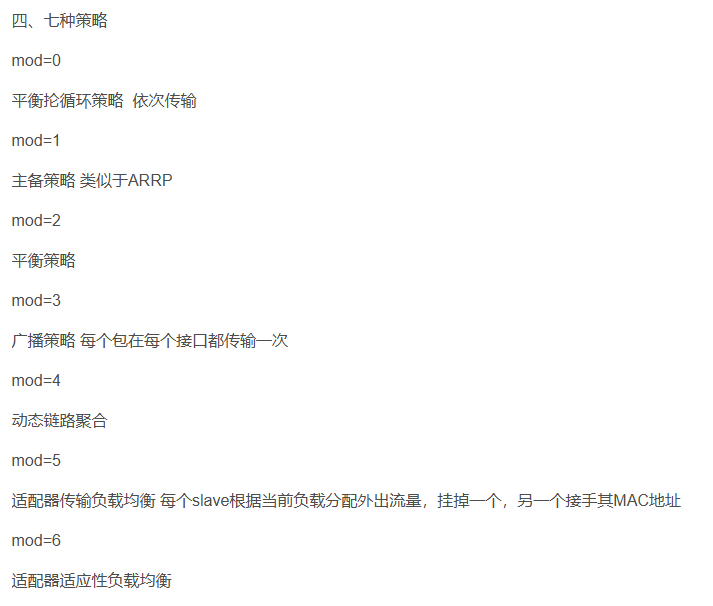 要在dpdk-testpmd创建1个bond网卡,转发bond网卡和tap之间的流量。启动时要注意EAL日志,参数写错了会报错了。
# ./dpdk-testpmd -l 0-3 -n 4  --vdev=net_tap0,iface=tap0 -- -i --port-topology=chained

Configuring Port 0 (socket 0)
Port 0: D0:9F:D9:70:6E:77
Configuring Port 1 (socket 0)
Port 1: D0:9F:D9:70:6E:76
Configuring Port 2 (socket 0)
Port 2: C6:44:56:84:8C:92
Checking link statuses...
Done
-
创建bond网卡,1 表示 mode, 0 是socket id。输出显示创建的bond网卡id是3
testpmd> create bonded device 1 0 Created new bonded device net_bonding_testpmd_0 on (port 3). -
打印所有网卡状态, 这里0 和1 是将被bonding的网卡,2是tap设备, 3是bond网卡。
testpmd> show port stats all -
添加slave网卡。注意建议先关掉bond网卡,再添加slave网卡。
testpmd> add bonding slave 0 3 testpmd> add bonding slave 1 3 -
查看bond网卡配置, 如果添加slave网卡前没有停bond网卡,就会出现下面的打印,虽然Slave网卡显示有两个,但是Active的是空的。这时需要关闭再启动bond网卡。
testpmd> show bonding config 0 show bonding config 3 Bonding mode: 1 Slaves (2): [0 1] Active Slaves: [] Primary: [0] - 关开bond网卡
testpmd> port stop 3 Stopping ports... Done testpmd> port start 3 Configuring Port 3 (socket 0) -
设置转发网卡id,以及启动转发。
testpmd> set portlist 2,3 testpmd> start -
修改Bond模式
set bonding mode 3 2
using nmcli to create bond device
nmcli connection add type bond con-name bond0 ifname bond0 bond.options "mode=active-backup"
nmcli connection add type bond con-name bond0 ifname bond0 bond.options "mode=4"
nmcli connection add type ethernet slave-type bond con-name bond0-port1 ifname enp9s0 master bond0
nmcli connection add type ethernet slave-type bond con-name bond0-port2 ifname enp10s0 master bond0

nmcli connection modify bond0-port1 ipv4.method disabled ipv6.method disabled
nmcli connection modify bond0-port2 ipv4.method disabled ipv6.method disabled

nmcli connection modify bond0   ipv4.addresses 10.13.32.200/24 ipv4.gateway 10.13.32.1

---

nmcli connection add type bond con-name bond1 ifname bond1 bond.options "mode=active-backup"
nmcli connection add type ethernet slave-type bond con-name bond1-port1 ifname enp7s0d2 master bond1
nmcli connection add type ethernet slave-type bond con-name bond1-port2 ifname enp7s0d3 master bond1

nmcli connection modify bond1-port1 ipv4.method disabled ipv6.method disabled
nmcli connection modify bond1-port2 ipv4.method disabled ipv6.method disabled

nmcli connection modify bond1   ipv4.addresses 10.13.31.200/24 ipv4.gateway 10.13.31.1
HOST Machine
#Bond1 32.200
i40e 0001:08:00.0 enP1s6f0: renamed from eth0
i40e 0001:08:00.1 enP1s6f1: renamed from eth0

#Bond0  31.200
rnpm 0000:05:00.1 ens2f1d2: NIC Link is Up 10 Gbps, Flow Control: RX/TX
rnpm 0000:05:00.1 ens2f1d3: NIC Link is Up 10 Gbps, Flow Control: RX/TX
Virtual Machine
#bond0  31.200
rnpm 0000:05:00.0 enp5s0d2: renamed from eth2
rnpm 0000:05:00.0 enp5s0d3: renamed from eth3

#bond1  32.200
i40e 0000:06:00.0 enp6s0: renamed from eth1
i40e 0000:07:00.0 enp7s0: renamed from eth0